A digital chore chart that keeps track for you
A paper chore chart works for about a fortnight. Then the stickers run out, nobody remembers whose turn it is, and you’re back to nagging. FridgeBoard puts the chore chart on the fridge, on the iPad you already have, and on every phone at home. It knows whose turn it is, what’s late, and who has earned what.
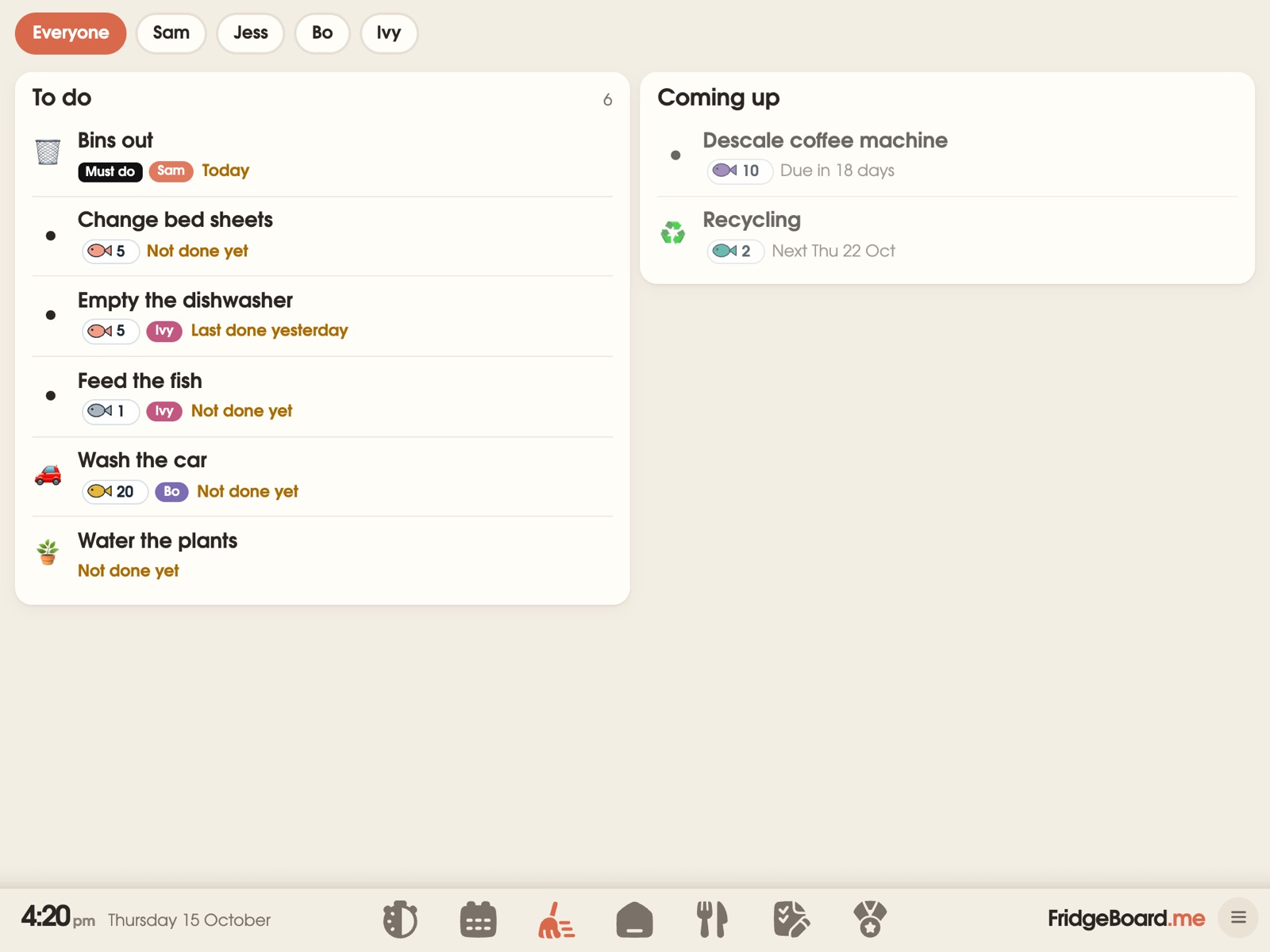
Chores that repeat the way your family actually works
Every chore has a person (or a few), and a pattern: every day, weekdays, Saturdays, every second week, the first of the month. Give it a time to finish by (“Empty the dishwasher by 5pm”) and it turns red if it’s missed, so a quick look at the fridge tells you what still needs doing. Chores can come up more than once a day, too, like feeding the fish morning and night.
- Take turns automatically. Set a chore to rotate between two or more children, and FridgeBoard swaps whose turn it is each time it’s done, each day or each week. No more “I did it last time”.
- Any time chores. The bins, the dog poo, the car: some jobs don’t belong to anyone. Whoever does it taps their circle and gets the credit.
- Several people on one chore. When two kids clean the bathroom together, both get the tick and the coins.
- Steps inside a chore. “Clean your room” can be broken into put clothes away, make the bed, books on the shelf, so younger children know what done looks like.
- Not today, or move it. Skip a chore for a day, or move it to tomorrow, without breaking the pattern.
- Done last night? A late tick can count for yesterday, so a chore done before bed isn’t marked missed.
On the fridge for the kids, on your phone for you
Children tick chores off on the shared screen in the kitchen, where they’ll see them. Each child has their own card in their colour with just their chores for today. Adults add and change chores from their own phones, in the shops or at work, and the fridge updates straight away.
Teenagers with their own phone can tick off their chores there too, but they can’t change settings or give themselves coins. A household PIN keeps the settings for grown-ups.
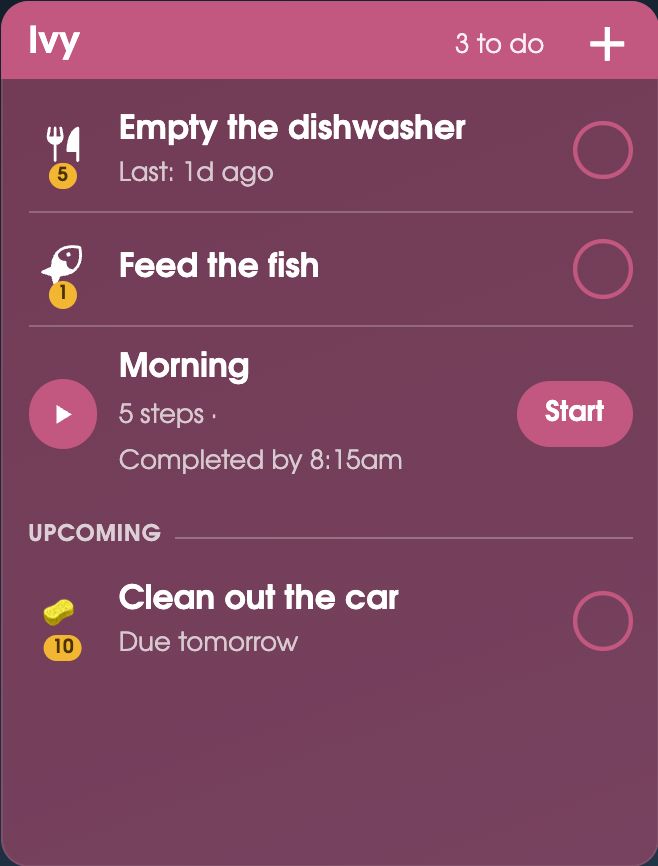
Chores that earn coins, and a shop to spend them in
Give any chore a value in coins. Coins stack up on the fridge where everyone can see them, and the children spend them in a shop you fill: choose the movie, an ice cream trip, stay up 30 minutes late, or real pocket money (50 cents a coin, for example). You can also set a shared goal the whole family saves towards together, like a trip to the water park.
Coins are optional. Some families use them for everything, some only for extra jobs, and some switch them off and just use the ticks. More about coins and rewards.
Household jobs, not just kids’ chores
The same chart handles the grown-up jobs that only come up every so often: descale the coffee machine every 30 days after it was last done, change the smoke alarm batteries, clean the gutters. Group jobs by room or section, and see which bins go out tonight. When someone has ten minutes free, “What should I do now?” picks one job at a time from about 200 everyday jobs. More about the household cleaning schedule.
Ideas for a chore chart that sticks
- Start small. Two or three chores per child for the first week, then add more once the habit is there.
- Match the chore to the age. A 4-year-old can feed the pet and put toys away; a 10-year-old can empty the dishwasher and take out the bins. See our chores by age list.
- Make it visible. A chart on the fridge gets looked at many times a day. A chart in an app on a parent’s phone mostly doesn’t.
- Reward finishing, not reminding. If a child only does it after the third reminder, a finish-by time and coins do the reminding for you.
- Rotate the jobs nobody wants. Taking turns is fairer and saves the argument.
Setting it up
- On your phone, go to fridgeboard.me and tap Try it free. Add who lives at home.
- Add chores to each person. Choose how often, a finish-by time if you want one, and coins.
- On the iPad, open Safari, go to fridgeboard.me, tap Open, then Use this as the shared screen. Scan the code with your phone.
- Put the iPad on the fridge or the bench. The chore chart is on it, and on every phone you invite.
It works on any iPad from the iPad 2 on, including old ones that no longer get updates, and on Android tablets and computers. Turning an old iPad into a family screen.
Questions
Is there a chore chart app that shows on the fridge?
Yes. FridgeBoard runs as a chore chart on an iPad or tablet on the fridge, and on every phone at home, all kept in sync. Children tick chores on the fridge; parents manage them from their phones.
Can the chore chart rotate chores between kids?
Yes. A chore can take turns between two or more people, swapping each time it’s done, each day or each week, so FridgeBoard always knows whose turn it is.
Does it work as an allowance or pocket money tracker?
Yes. Chores earn coins, and coins can be spent in a shop you set up, including real pocket money at a rate you choose, like 50 cents a coin. Each child’s coins show on the fridge and on parents’ phones.
Can kids change their own chores or give themselves coins?
No. Children can tick off their chores, but changing chores, settings and coins needs an adult, and a household PIN can protect the shared screen.
Is it a subscription?
No. FridgeBoard is one payment for the whole household (US$24 plus tax in the US, A$39 in Australia), with every feature included and a 5-day free trial with no card needed.
Does it work for adults and teenagers too?
Yes. Adults can have their own chores and household jobs, and teenagers can tick off theirs from their own phone.