Home › Features › Meal planner
A weekly meal planner on the fridge, so nobody asks “what’s for dinner?”
FridgeBoard is a family meal planner that shows the week’s breakfasts, lunches and dinners on the fridge, on an iPad you already own, and on every phone at home. Plan the week, keep your recipes in one place, and send the ingredients straight to the shared shopping list.
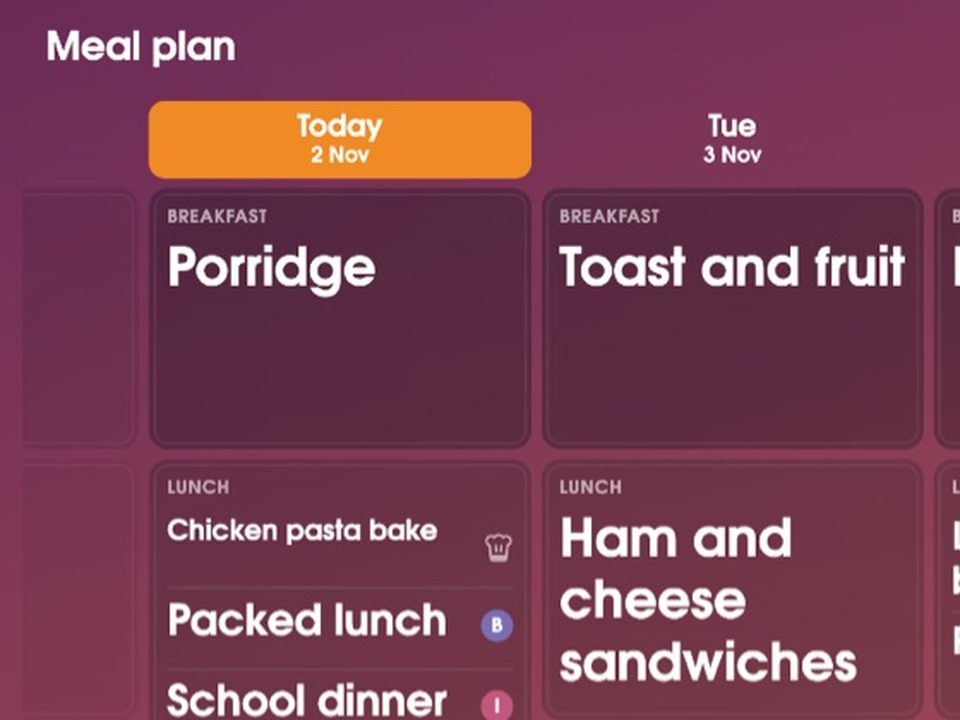
A family meal planning board everyone can see
The question “what’s for dinner?” gets asked a lot in most houses, usually at 5pm, usually by someone hungry. A meal plan on the fridge answers it before anyone asks. It also answers the 4pm question for the person cooking: is the chicken out of the freezer?
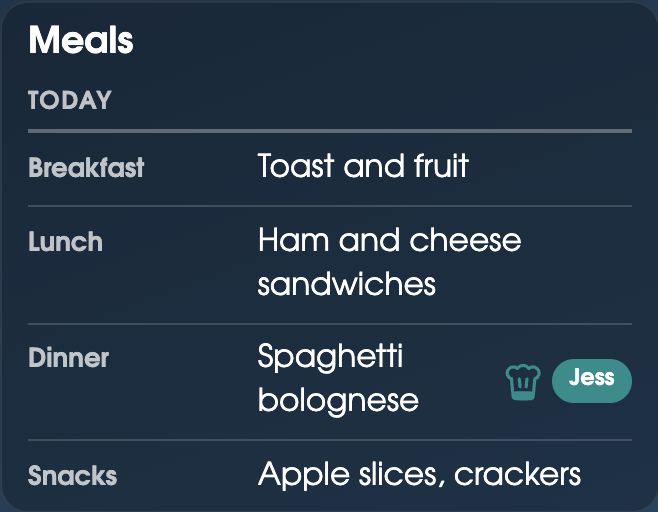
On the shared screen, the Meals tab shows the days side by side, and you swipe sideways to see the rest of the week. Each day can have breakfast, lunch, dinner and snacks. Tap an empty meal to plan it, or a planned one to see its recipe big enough to cook from. A Meals card on Home shows just today.
A recipe organiser, and the shopping list done for you
- Keep your recipes. Type in Nan’s lasagne, or paste the link from a recipe website and the ingredients fill themselves in.
- Meals you’ve had before. When you plan a meal, the ones you’ve made before are there to pick from, with their recipes.
- From meal plan to shopping list. Send the week’s ingredients to the shared shopping list. Like things are added together, so 2 eggs and 3 eggs is 5 eggs, and the list sorts itself by aisle.
- Who’s cooking. Say who’s making each meal, and it shows in their colour.
- Plans change. Move a meal to another day when soccer runs late and Tuesday becomes takeaway.
A meal each, when people eat differently
Not every family eats the same thing at every meal. One child takes a packed lunch, another has school dinner, and a parent eats at work. A meal can be planned for one person, so the plan shows what each person is actually having. It helps on nights when one child is at training and eats later, too.
On the calendar, and on every phone
Today’s dinner also shows in the family calendar, in each day, so you see the meal next to the swimming lesson that might get in its way. Every adult can plan meals from their own phone. If you already put meals in Google Calendar or Outlook (“Dinner: Tacos”), FridgeBoard can use those events as the meal plan. And if a family doesn’t want meal planning, it can be switched off.
Can’t decide? Put the choices on the decision wheel and let the kids spin for it.
Meal planning tips that make the week easier
- Plan four or five dinners, not seven. Leave a night for leftovers and a night for something easy. Plans with no slack fall apart by Wednesday.
- Check the calendar first. On the night of a late training session, plan something quick or something already made.
- Give nights a theme. Pasta Monday, taco Tuesday, soup Thursday. It cuts the deciding in half, and children like knowing.
- Cook once, eat twice. A big batch of bolognese on Sunday is lasagne on Wednesday.
- Look in the fridge before you plan. Start with what needs using up. A Use soon list on the fridge makes that easy.
- Let the kids pick one dinner a week. They’re more likely to eat it. It works well as a reward, too.
- Keep a list of meals everyone eats. On a tired night, pick from that list instead of inventing something.
- Shop once from the plan. One list for the week means fewer trips and less food thrown out.
Setting it up
- On your phone, go to fridgeboard.me and tap Try it free. Add who lives at home.
- Open Meals and plan a few dinners for this week. Add recipes as you go, or paste a recipe link.
- Send the week’s ingredients to the shopping list.
- On the iPad, open Safari, go to fridgeboard.me, tap Open, then Use this as the shared screen. Scan the code with your phone. Add the Meals card to Home if you like.
It runs on any iPad from the iPad 2 on, Android tablets and computers. Turning an old iPad into a family screen.
Questions
Is there a meal planner app that shows on the fridge?
Yes. FridgeBoard shows the week’s meal plan on an iPad or tablet on the fridge and on every phone at home, all kept in sync. Anyone can see what’s for dinner, and adults plan from their phones.
Can the meal plan make my shopping list?
Yes. Send a week of meals to the shared shopping list and the ingredients are added, with like things added together and sorted by aisle.
Can I save recipes from websites?
Yes. Paste a recipe website’s link and the ingredients fill themselves in. You can also type your own recipes, and meals you’ve had before are there to pick again.
Can people in the family have different meals?
Yes. A meal can be planned for one person, so a packed lunch for one child and school dinner for another both show on the same day.
Does it plan breakfast and lunch too?
Yes. Each day can have breakfast, lunch, dinner and snacks, or just the meals you want to plan.
How much does it cost?
FridgeBoard is one payment for the whole household (US$24 plus tax in the US, A$39 in Australia), with no subscription and a 5-day free trial with no card needed. The meal planner, calendar, chores and lists are all included.