Home › Features › Decision wheel
Spin the wheel: a decision wheel for dinner, chores and who goes first
FridgeBoard has a spinning decision wheel on the family’s shared screen in the kitchen. The kids spin it to decide what’s for dinner, whose turn it is to unload the dishwasher, or who goes first, and nobody argues with the wheel. The secret: from your phone, a parent can quietly pick where it lands next, or leave it random.
Why a wheel works with kids
“It’s not fair” is hard to argue with when a parent decides. It’s much easier when the wheel decides. Children accept a spin they did themselves, and the spinning is half the fun. A decision wheel for kids turns a small fight (who sits in the front, who picks the movie) into a ten-second game, and you get to stay out of it.
How the wheel works on the shared screen
- Open it any time. Tap the stopwatch at the end of the tabs in the bottom bar, and the Decision wheel is at the bottom of the timers drawer.
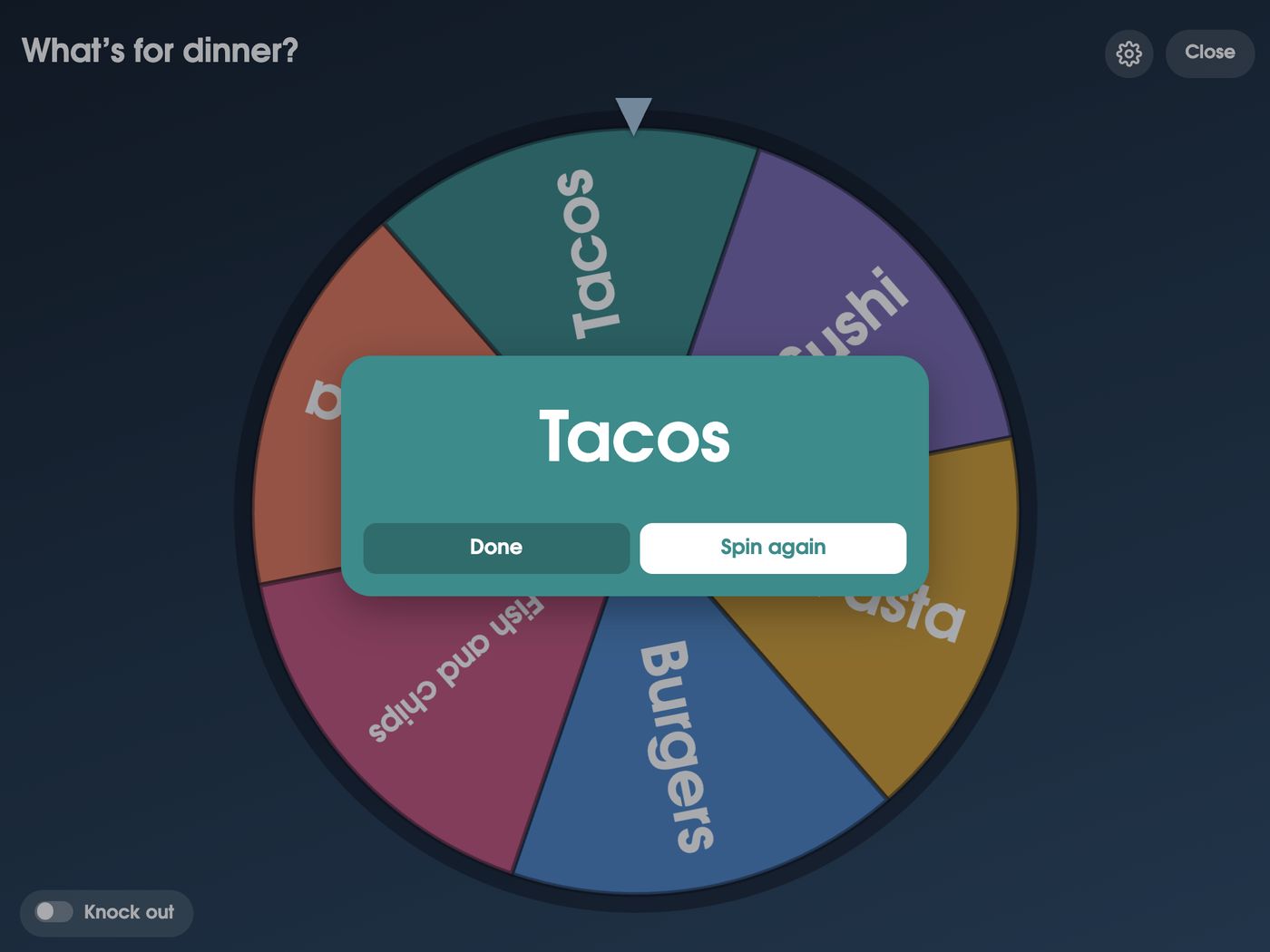
- Spin. It spins on the screen and lands with a big result: Tacos. Tap Done, or Spin again.
- Ready-made wheels. A People wheel with everyone at home (tick who’s on it), any of your lists with two or more things on it, and your recipe book, so “what’s for dinner?” spins through meals you actually cook.
- Your own wheels. Make a new wheel on the screen or from your phone: movie night picks, who walks the dog, which park.
- Fair random. With three or more options, a random spin never lands on the same thing twice in a row.
- Knock out. Turn on Knock out and each spin takes off what it landed on, until only one is left. Good for picking an order, or for a last-one-standing game. Knock out is always random.
The secret: pick where it lands from your phone
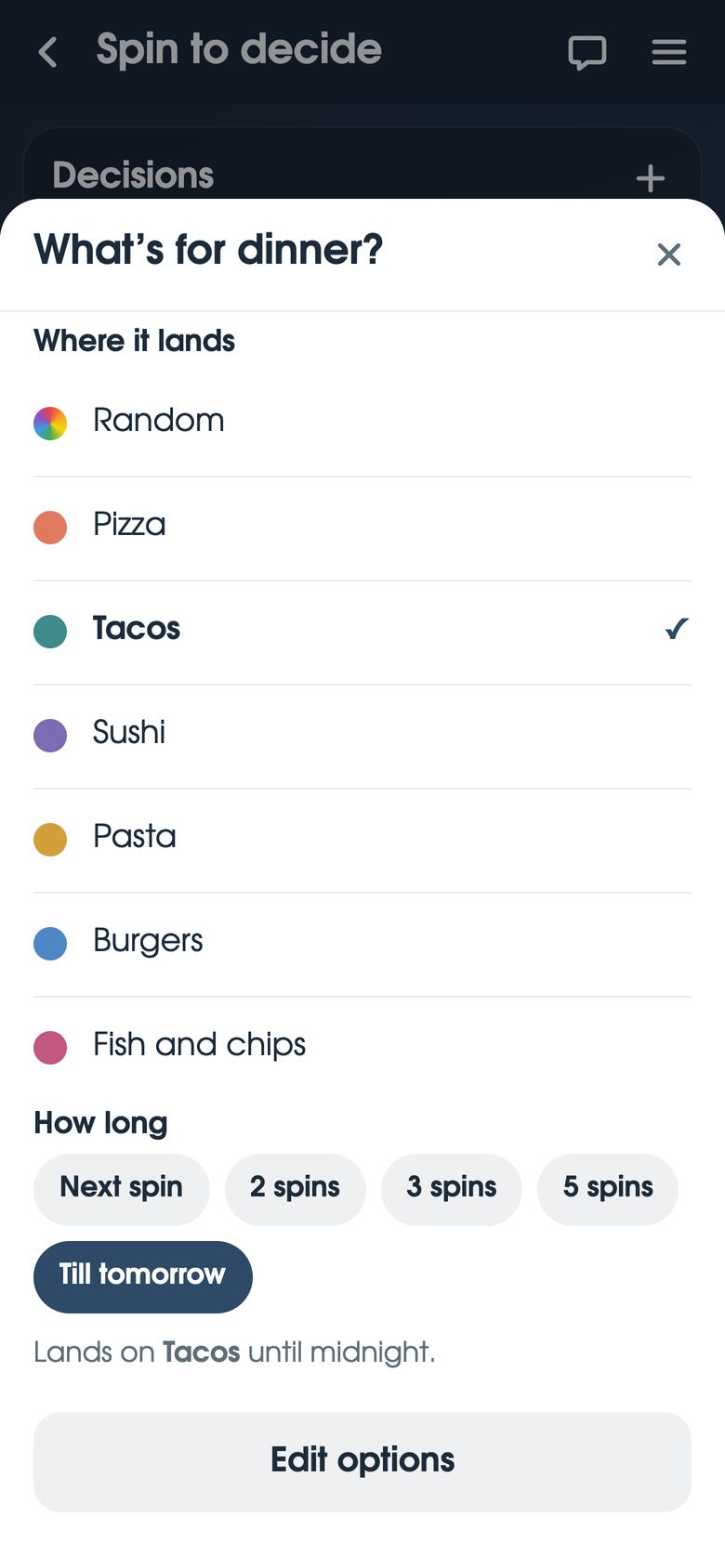
On your phone, tap ☰, then Spin to decide. Pick a wheel, then pick where it lands: Random, or any option on it. Then choose for how long: the next spin, 2 spins, 3 spins, 5 spins, or till tomorrow (it goes back to random at midnight).
The shared screen gives nothing away. A fixed spin looks exactly like a random one, it isn’t shown on the screen, and it isn’t in the History. Only an adult’s phone can set it. Children with their own phone can’t.
Some ways parents use it:
- Dinner. You’ve already bought the taco shells. The wheel lands on Tacos, and everyone’s happy it was the wheel’s idea.
- Fair turns. Bo has picked the movie three Fridays running. Set the next spin to Ivy.
- Quiet nudges. Someone needs a win today. The wheel can give it to them.
- Or don’t. Leave it on Random and it’s a true spin. It’s your call.
Fun ideas for family wheels
A wheel works for any choice that’s small, fair and a bit fun. Some ideas to start with, on FridgeBoard or a paper wheel on the fridge:
- What’s for dinner? Your regular meals, or tonight’s takeaway (pizza, Thai, fish and chips).
- Chore wheel. Who unloads the dishwasher, who wipes the table, who feeds the dog. For chores that come round every day, FridgeBoard’s chore chart can also take turns for you.
- Who goes first? First in the bath, first turn on the game, first pick of the cake.
- Who sits in the front seat on the way to sport.
- Friday movie night. Each person adds one film; spin with Knock out on to choose the order across the month.
- Weekend outing. The beach, the park, the library, a bike ride, the pool.
- Rainy day jobs. Lego, baking, a board game, drawing, a cubby in the lounge.
- Dessert or treat. Ice cream, fruit salad, popcorn, nothing (keep that one for when you’ve fixed it).
- Story time. Which book, or who chooses tonight.
- Kindness challenge. Write a note, help someone with a job, call Grandma.
Tip: keep wheels short. Five to eight options is easy to read on the screen, and every slice feels like it has a real chance.
Setting it up
- On your phone, go to fridgeboard.me and tap Try it free. Add who lives at home.
- On the iPad or tablet, open the web browser, go to fridgeboard.me, tap Open, then Use this as the shared screen. Scan the code with your phone.
- On the screen, tap the stopwatch, then Decision wheel. Spin the People wheel, or make your own.
- On your phone, tap ☰, then Spin to decide whenever you want to pick where it lands.
It works on any iPad from the iPad 2 on, Android tablets and computers. Turning an old iPad into a family screen.
Questions
Is there a spin the wheel for what’s for dinner?
Yes. FridgeBoard’s decision wheel can spin through your recipe book or a dinner wheel you make, on the family’s shared screen in the kitchen. The kids spin it and the wheel decides.
Can I make a chore wheel for my kids?
Yes. Make a wheel with the jobs or with the children’s names and let them spin. For chores that repeat every day, FridgeBoard’s chore chart can also take turns between children automatically.
Can a parent choose where the wheel lands?
Yes. On a parent’s phone, Spin to decide lets you pick where a wheel lands for the next 1, 2, 3 or 5 spins, or till tomorrow. The shared screen shows no sign of it, and you can leave it random instead.
Is the decision wheel really random?
When it’s left on Random, yes, and with three or more options it never lands on the same one twice in a row. It’s only fixed if a parent picks where it lands from their phone.
Can kids see that the wheel has been set?
No. A fixed spin looks exactly like a random one, and it isn’t shown on the shared screen or in the History. Only an adult’s phone can set it.
Does the decision wheel cost extra?
No. The wheel is part of FridgeBoard, which is one payment for the whole household (US$24 plus tax in the US, A$39 in Australia) with every feature included and no subscription.