Home › Features › Rewards and pocket money
A reward chart for kids that never runs out of stickers
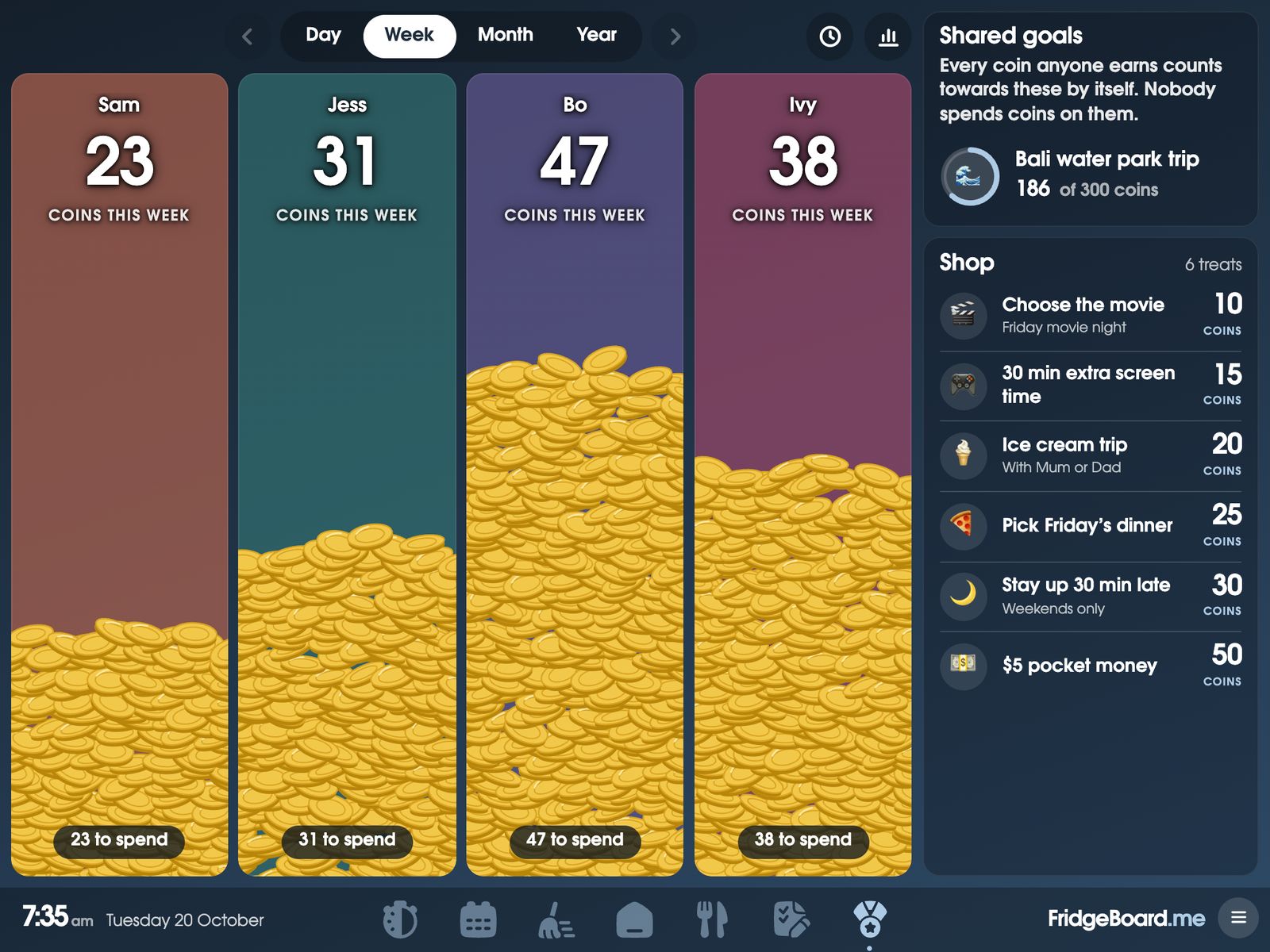
FridgeBoard is a reward chart and pocket money tracker that lives on the fridge, on an iPad you already own, and on every phone at home. Children earn coins for chores and routines, watch them pile up on the shared screen, and spend them in a treat shop you fill, or save them towards a goal the whole family shares.
Why a sticker chart stops working
Most families have tried a sticker chart on the fridge. It goes well for a week or two. Then the stickers run out, the chart fills up, someone forgets to add the sticker for yesterday, and nobody can remember what ten stickers were meant to buy. The chart comes down and the nagging comes back.
A digital reward chart fixes the boring parts. Coins are added the moment a chore is ticked, the count is always right, and the treats and their prices are written down where everyone can see them. You don’t have to remember who earned what, and the kids can’t argue with the total.
How coins and rewards work
- Coins for chores. Give any chore a value: 2 coins to feed the fish, 20 to wash the car. When it’s ticked, the coins land on that child’s pile on the shared screen. Finishing a routine and keeping up a habit can earn coins too.
- A treat shop you fill. Choose the movie for 10 coins, an ice cream trip for 20, stay up 30 minutes late for 30. Treats can be marked in stock or not, so the ice cream trip can wait until the weekend.
- Saving for something. A child can pick the treat they’re saving for, and their card shows it.
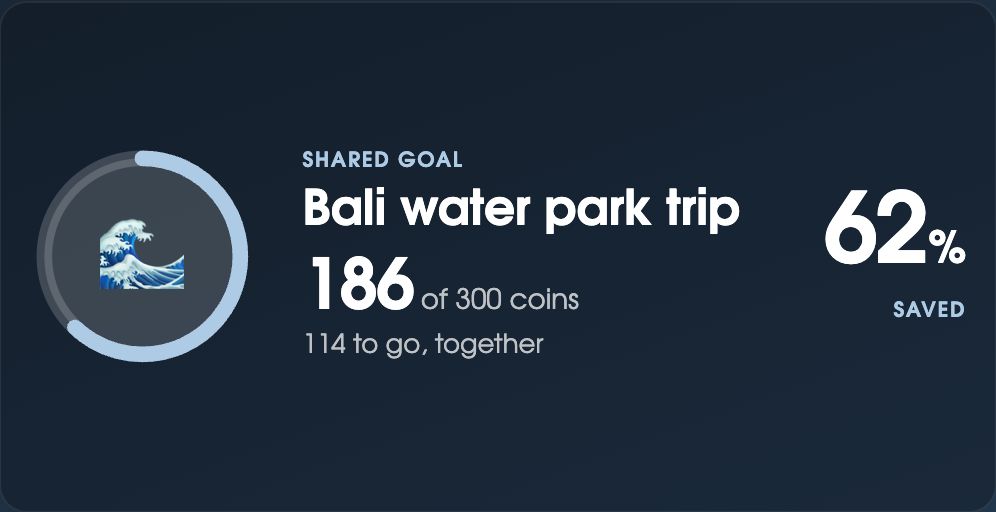
- Shared goals. Set a goal the whole family saves towards together, like a water park trip or a new board game. Every coin anyone earns moves the ring along, and spending in the shop doesn’t take it backwards.
- Coins from a grown-up. An adult can add coins for something kind or helpful that wasn’t on the chart, or take some away, from their phone or on the shared screen with the household PIN.
- Everything written down. Every coin earned, spent, added or taken away is in History, with who did it and where.
Coins work the same for chores in your chore chart, steps in the morning and bedtime routines, and goals in the habit tracker.
An allowance tracker, if you want real pocket money
Coins can stay as points, or they can be money. Switch on pocket money and choose what each coin is worth, for example 50 cents or a dollar. The shared screen then shows each child’s total as money (“$10.50 to spend”), and the phone has a Cash out button for when you hand it over.
For pocket money that isn’t earned, there are scheduled coins: a set amount each week, a bonus on each child’s birthday, or something extra at Christmas or the end of term. On the day, the shared screen shows a banner and the child taps Collect to watch the coins land. You can also clear the week’s coins each week, if your family starts fresh every Monday (or Sunday).
Not sure how much to give? Our guide to pocket money by age has a starting point for each age.
Reward ideas that cost nothing
The best rewards are often time and choice, not things. These are worth putting in your shop, and none of them cost money:
- Choose the movie for family movie night
- Pick Friday’s dinner, or what goes on the pizza
- Stay up 15 or 30 minutes later on a weekend
- An extra bedtime story, or a chapter more
- Choose the music in the car for a whole trip
- Skip one chore, with someone else doing it this time
- Sleep in a fort or a tent in the lounge room
- A trip to the park, the beach or the library with one parent
- Have a friend over
- Choose the board game, and a grown-up has to play
- Make pancakes together for Sunday breakfast
- Pick the family walk or bike ride this weekend
- Ten minutes of one-on-one time doing whatever they choose
- Extra screen time, if that’s a treat in your house
Mix small, cheap treats (10 coins) with bigger ones worth saving for (100 coins or more). Children learn to wait when the big one is up there on the fridge every day.
Tips for a reward chart that keeps working
- Make the first reward easy to reach. If the first treat takes a month, younger children give up. Something in the first few days gets them going.
- Keep prices steady. Change them, and the kids will notice. Add new treats instead.
- Reward the job, not the reminding. A coin for a chore done without being asked is worth more than a coin after three reminders.
- Use a shared goal for siblings who compete. Working towards the same trip turns “she got more than me” into “we’re nearly there”.
- Let them spend it. Coins that can never be spent stop meaning anything.
Setting it up
- On your phone, go to fridgeboard.me and tap Try it free. Add who lives at home.
- Add chores and give them coins. Then tap ☰, then Rewards, and add a few treats to the shop and a shared goal if you like.
- For real pocket money, switch it on in Rewards settings and choose what a coin is worth. Add weekly or birthday coins under Scheduled coins.
- On the iPad, open Safari, go to fridgeboard.me, tap Open, then Use this as the shared screen. Scan the code with your phone.
- Set a household PIN, so buying a treat on the shared screen needs a grown-up.
It runs on any iPad from the iPad 2 on, Android tablets and computers. Turning an old iPad into a family screen.
Questions
What is a good reward chart app for kids?
FridgeBoard is a reward chart that shows on an iPad or tablet on the fridge and on every phone at home. Children earn coins for chores, routines and habits, and spend them in a treat shop the parents fill or save towards a shared family goal.
Can it track pocket money or an allowance?
Yes. Switch on pocket money and choose what each coin is worth, and each child’s total shows as money. Scheduled coins can add a set amount each week or on birthdays, and parents cash out from their phone.
Can kids give themselves coins or buy treats without asking?
No. Children can tick off their chores, but adding coins or buying a treat on the shared screen needs the household PIN. Every coin earned or spent is kept in History.
Can the whole family save towards one goal?
Yes. A shared goal, such as a water park trip, counts every coin anyone earns, and spending in the shop doesn’t take it backwards. You can have several goals at once.
Is it a behaviour chart?
Not exactly. Coins come mostly from chores, routines and habits, but an adult can add coins for good behaviour or take some away, and every change is written down in History.
Is there a subscription?
No. FridgeBoard is one payment for the whole household (US$24 plus tax in the US, A$39 in Australia), with every feature included and a 5-day free trial with no card needed.