Home › Features › Family command center
A family command center for the kitchen, on a screen you already own
FridgeBoard turns an iPad, Android tablet or computer you already have into a family command center (or command centre, depending on where you live): one shared screen in the kitchen with the calendar, chores, shopping list, meals, routines and messages, kept in sync with every phone at home. It’s the household dashboard a whiteboard tries to be, except it updates itself and nobody has to rub anything out.
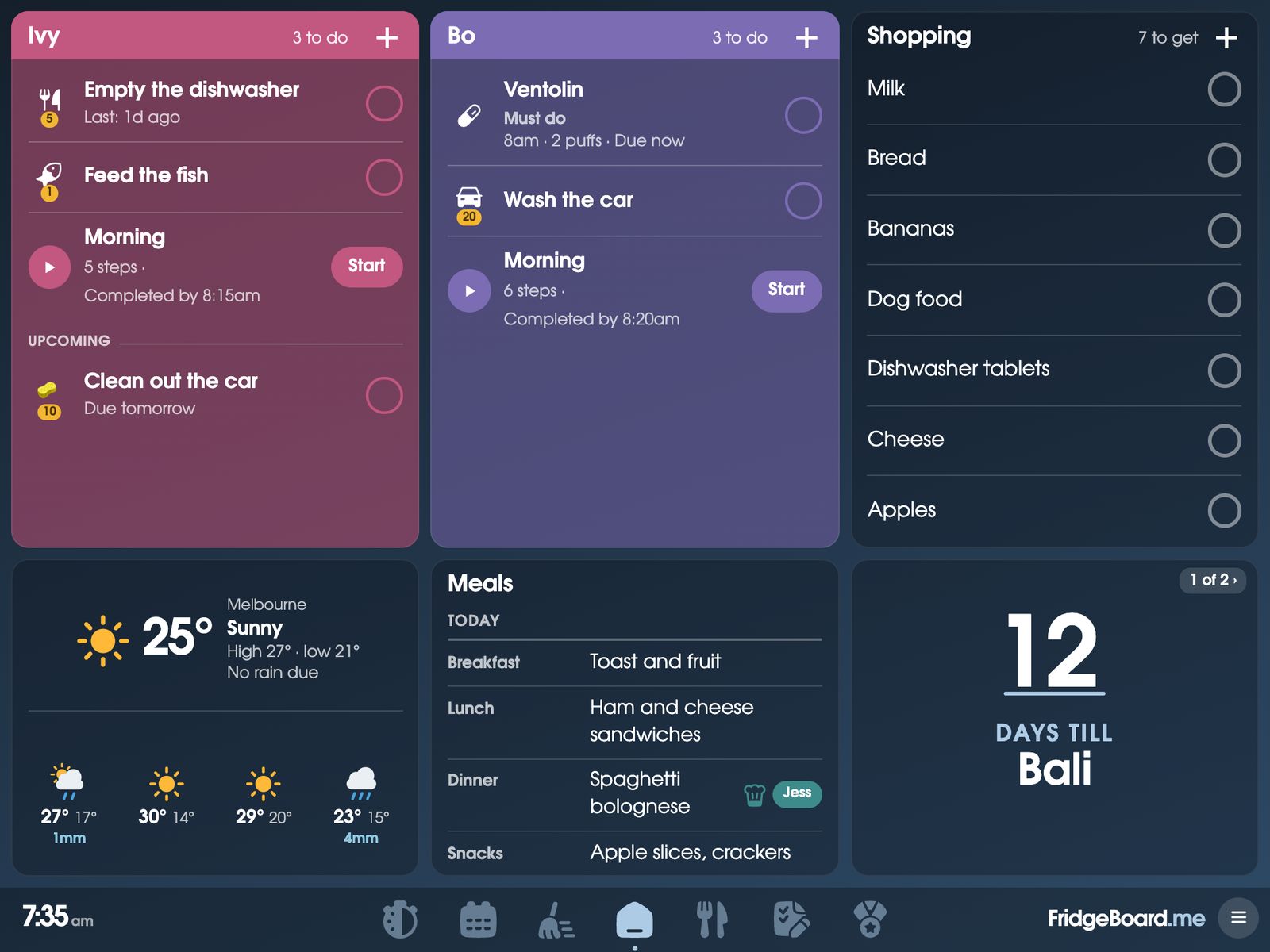
What goes on a family command center
A family hub works when it answers the questions people ask in the kitchen all day: what’s on, whose turn is it, what’s for dinner, do we need milk. On FridgeBoard each of those is a card on the shared screen, and you choose which cards go on Home and how big they are.
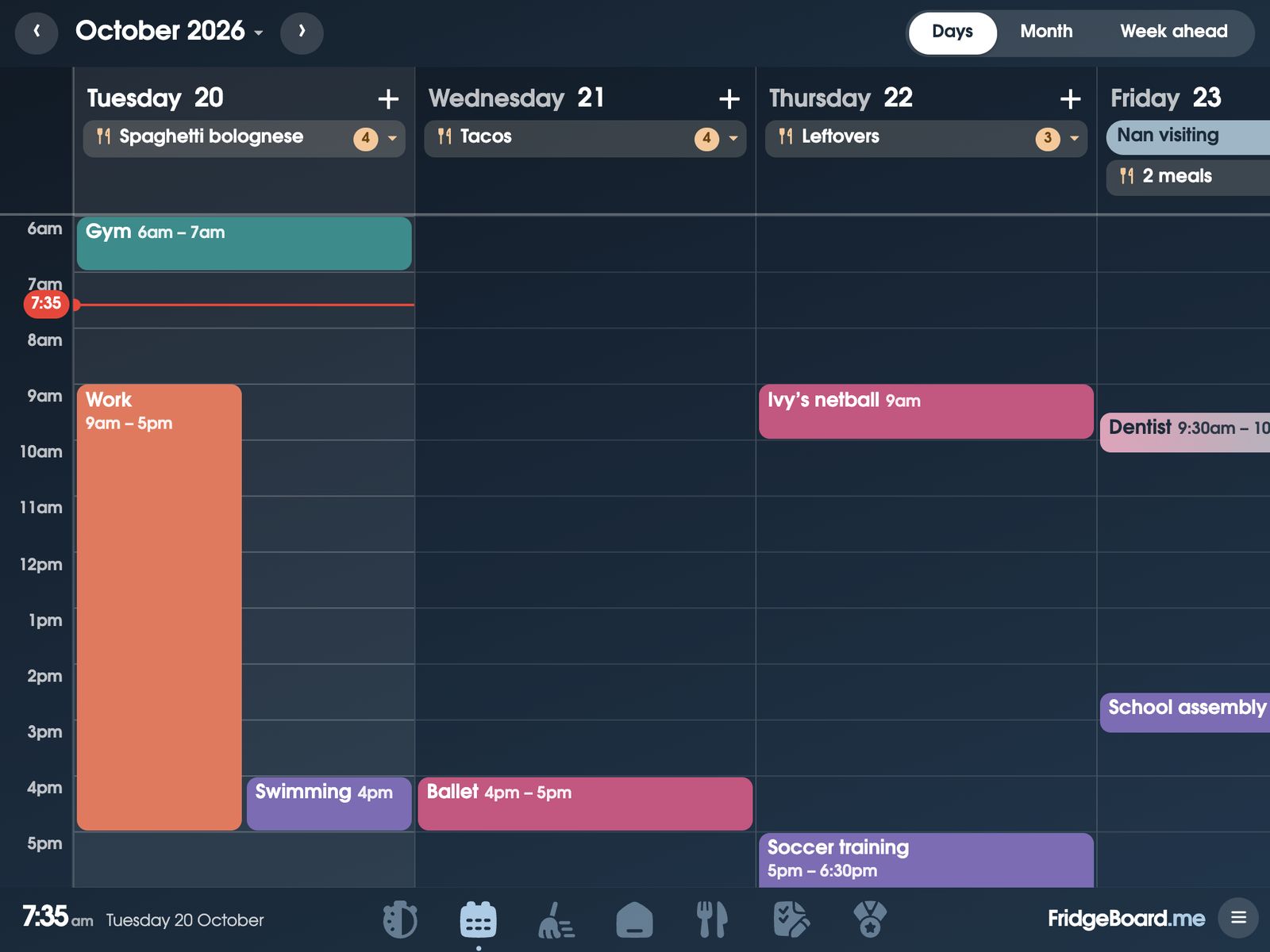
- The family calendar. Google Calendar and Outlook sync both ways, and iCloud, school and club calendars can be shown too. Each person’s events are in their own colour. Family calendar.
- Chores and coins. Each child’s chores for today, who’s on the bins tonight, and coins they can spend in a shop you fill. Chore chart and rewards.
- The shopping list. One list on the fridge and every phone, sorted by aisle. Shopping list.
- Meals. The week’s dinners (and breakfasts and lunches if you like), with recipes that send their ingredients to the list. Meal planner.
- Routines. Morning and bedtime, one step at a time, with pictures for children who can’t read yet. Kids’ routines.
- Medicine and pets. Who gave Bo’s Ventolin and when, and whether Max has had his dinner. Medicine tracker and pet care.
- Messages. “Dinner’s ready!” from your phone to the screen, ringing until someone taps Got it. Family messages.
- The little things. Weather, a countdown to the holidays, bills due, handy numbers, and from the stopwatch, kitchen timers and a decision wheel, plus and a photo or clock sleep screen at night.
A day with the shared screen
Here’s how a household dashboard fits into an ordinary school day. Here’s how a shared screen can fit into an ordinary school day, using our demo family.
- 6:45am. The screen wakes from its clock face. Bo’s card says Ventolin is due now. Sam gives it and taps the tick, so Jess can see from her phone that it’s done.
- 7:15am. Ivy taps Start on her morning routine. It walks her through dressed, breakfast, teeth, bag, one step at a time, with a finish goal of 8:00am. Bo starts his a few minutes later so they aren’t both waiting for the bathroom.
- 8:10am. On the way out, someone glances at Upcoming: swimming after school, Ivy’s netball at 5. Nobody needs to ask.
- Midday. Jess adds coriander to the shopping list from work. It’s on the fridge and on Sam’s phone straight away.
- 3:30pm. The kids are home. Bo empties the dishwasher before the 5pm finish-by time and gets his coins. Ivy feeds the fish.
- 5:45pm. Tonight’s dinner shows on the calendar, so whoever is cooking knows what it is. Two taps on the stopwatch set a 10-minute timer for the pasta.
- 6:30pm. From upstairs, Jess sends “Dinner’s ready! Come down please” to the screen. It keeps ringing until someone taps Got it.
- 7:00pm. Bedtime routines start. The calendar says the recycling goes out tonight, so Sam takes it out and ticks his Bins out chore.
- 9:30pm. The screen goes dark at the time you picked. A tap wakes it if you need to check tomorrow.
Where to put it
Put the screen where everyone walks past several times a day, usually the kitchen. Some ideas:
- On the fridge. Adhesive magnets on the back of the case hold an iPad on a metal fridge door. Check your fridge is magnetic first: some stainless steel doors aren’t.
- On the bench. In its case, leaning on the splashback or on a recipe book stand. Nothing to stick or drill, and you can carry it to the table for homework.
- On the wall by the back door. Good if the family drops bags and keys there. A wall mount suits a bigger screen.
- Near a power point. It stays plugged in all day, so plan where the cable goes before you stick anything.
- Eye height for the kids. If children tick their own chores, they need to reach it.
Whatever you use to put it up, you do it at your own risk: we can’t take responsibility for devices that fall or break.
Better than a family whiteboard?
A whiteboard or paper planner is cheap and anyone can use it. It also only lives in one place, so you can’t check it from the supermarket, and it never reminds anyone. A digital family planner board keeps the parts that make a whiteboard good (it’s big, it’s in the kitchen, everyone sees it) and adds the parts a whiteboard can’t do: chores that repeat and take turns, a list that’s on every phone, and a calendar that matches the one in your pocket.
Unlike a family calendar display you buy, FridgeBoard runs on a screen you already own. See how it compares on our alternatives page.
Setting it up with what you already own
- Find a screen. An old iPad in a drawer is ideal (any from the iPad 2 on). An Android tablet, a spare laptop or another screen with a browser works too.
- On your phone, go to fridgeboard.me and tap Try it free. Add who lives at home and pick what goes on the screen.
- On the tablet, open the web browser, go to fridgeboard.me, tap Open, then Use this as the shared screen. Scan the code with your phone.
- Set the screen to stay on and keep it charging. Getting an old iPad ready has the steps.
- Invite the other adults, and older children with their own phone, from Settings on your phone.
It takes about 5 minutes. There’s no app to install and no new screen to buy. Three shared screens are included, so you can add one at the top of the stairs too; a fourth or later is US$10 once.
Questions
What is a family command center?
A family command center (or centre) is one place in the home, usually the kitchen, where the household’s calendar, chores, lists and plans live so everyone can see them. FridgeBoard makes it a shared screen on a tablet you own, kept in sync with every phone at home.
Can I use an old iPad as a family command center?
Yes. FridgeBoard runs in the web browser on any iPad from the iPad 2 on, including old ones that no longer get updates. It also works on Android tablets and computers.
What should go on a family organizer screen?
Most families start with the calendar, each child’s chores and routines, the shopping list and the week’s meals. FridgeBoard lets you add or remove cards such as weather, a countdown, bills, timers and messages as you go.
Does it sync with Google Calendar?
Yes. Google Calendar and Outlook sync both ways, so an event added on the shared screen shows on your phone and the other way round. iCloud, school and club calendars can be shown from their links.
How much does a family command center cost with FridgeBoard?
FridgeBoard is one payment for the whole household: US$24 plus tax in the US, A$39 in Australia. There’s no subscription, and a 5-day free trial needs no card.
Can everyone in the family use it from their phone?
Yes. Every adult can use it from their own phone, and children with a phone can tick off their own chores and routines. Phones never count towards the screens included.