Home › Features
Everything FridgeBoard does
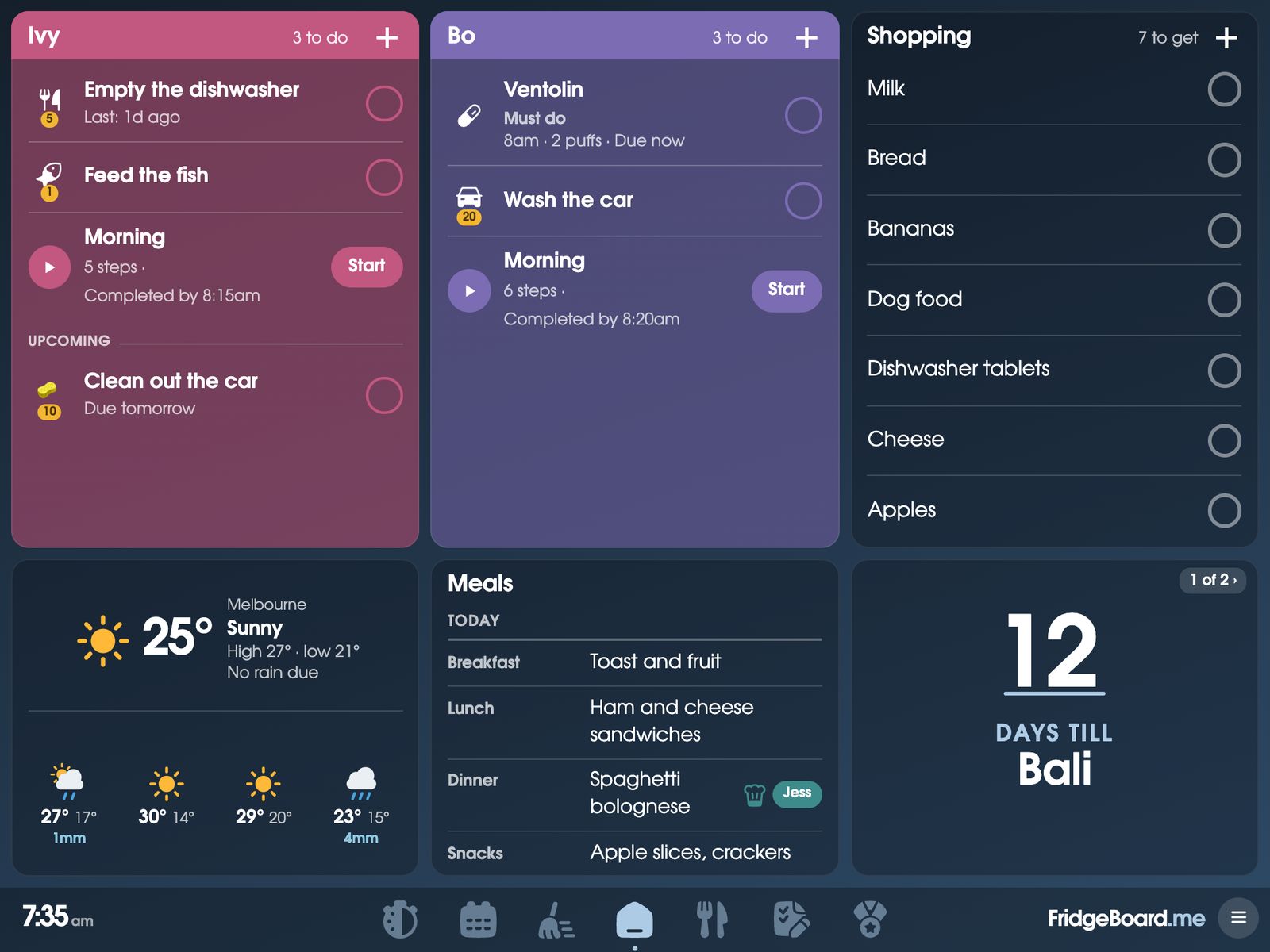
FridgeBoard turns an iPad you already own (even an old one), an Android tablet or any web browser into the household’s shared screen on the fridge or bench. It holds the family calendar, a chore chart with coins and rewards, the shopping list, meals, routines, habits, medicine and pet care, and messages, all kept in sync with every phone at home. Every feature below is included in one payment for the household, with no subscription.
Family calendar
Google Calendar and Outlook sync both ways, so an event added on the fridge is on your phone, and the other way round. iCloud, school and sports club calendars can be shown from their links. Up to 20 calendars are included. Each person’s events are in their own colour, in Days, Week and Month views, with today’s dinner and bin night on it too.
Chores, rewards and household jobs
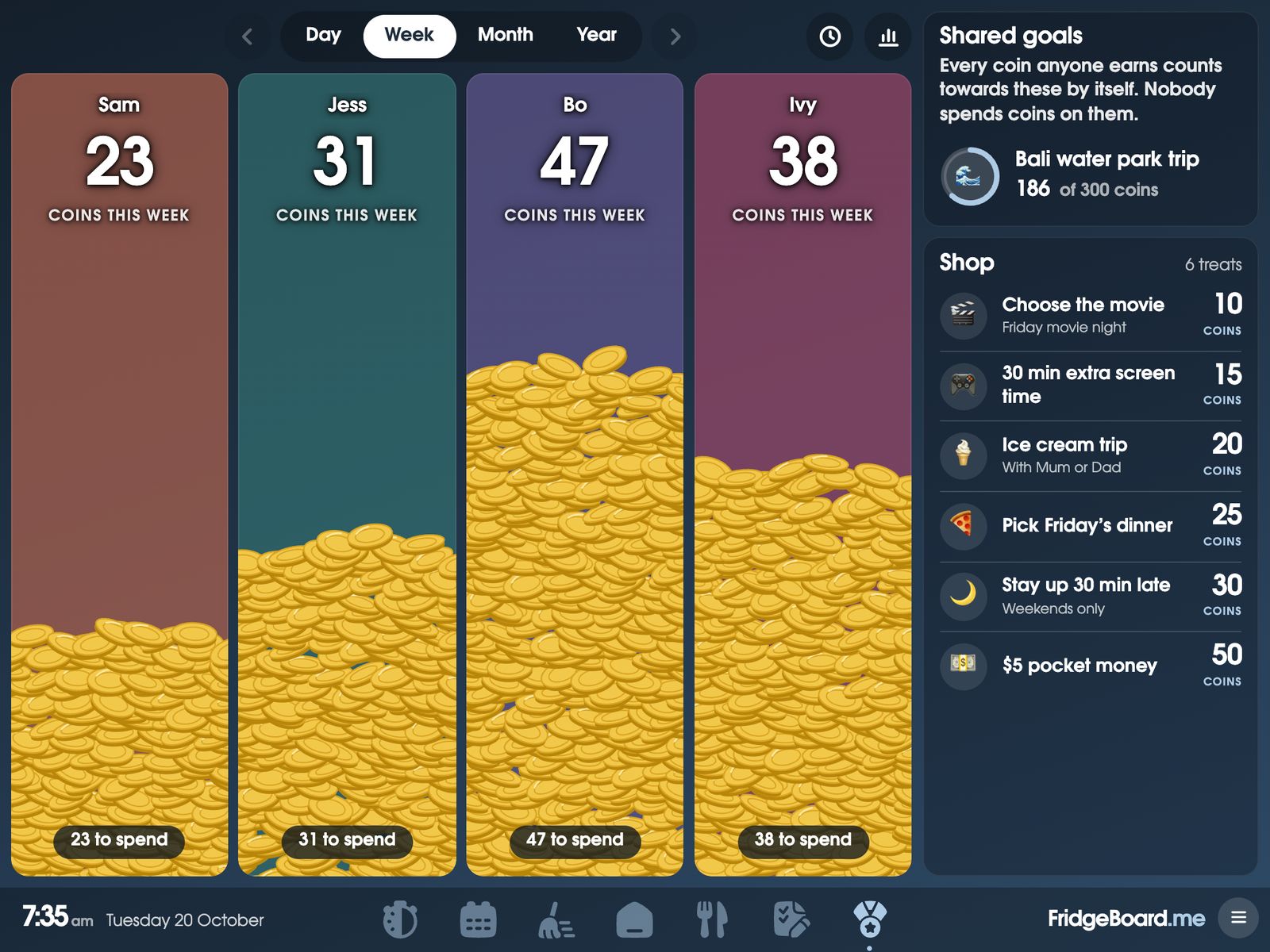
Chores for each person that repeat the way your family works, with a time to finish by. FridgeBoard knows whose turn it is and swaps each time. Any time jobs (the bins, the dog poo) go to whoever does them. Chores earn coins, and coins buy treats from a shop you fill, or real pocket money (an allowance, if you’re in the US). The grown-up jobs that come round every so often, like descaling the coffee machine, sit in the same place, grouped by room, with which bins go out tonight.
Shopping, lists and meals
One shopping list on the fridge and every phone, sorted by aisle with nothing to set up. Keep any number of other lists: Use soon for leftovers, packing for the holidays, handy numbers. Plan the week’s breakfasts, lunches and dinners, keep recipes (paste a recipe link and the ingredients fill in), and send the ingredients to the list.
Routines and habits
Morning, after-school and bedtime routines walk each child through one step at a time on the shared screen, with a finish goal they can read. For children who can’t read yet, Max the dog shows each step in a picture and it can be read aloud. Habits sit on each person’s card, ticked or counted, and fill in a chart like a paper one. Reading minutes can earn screen time.
Medicine and pets
A reminder when each dose is due and a tick when it’s given, with who gave it, so nobody doubles up or forgets. It’s a reminder and a log, not medical advice: follow your doctor’s or pharmacist’s instructions. Pets get the same, plus breakfast and dinner ticks, walks, and care reminders for flea treatment, worming and the vet.
Messages
Send “Dinner’s ready!” from your phone to one screen or every screen. Urgent messages ring until someone taps Got it, and your phone shows it was seen. Handy for children who don’t have a phone yet. Little notes take turns on a card for thank-yous and well dones.
The screen itself
Choose which cards go on Home and how big they are: a card for each person, weather, countdown, month calendar, bills, world clock, handy numbers, links and more. Kitchen timers and a decision wheel are a tap away on the stopwatch. Light, dark, transparent and colour gradient themes. After a few quiet minutes the screen shows your photos, a clock face you can read across the room, or your team’s live score, and it goes dark at night at the times you pick. Three shared screens are included, each with its own Home and sounds; a fourth or later is US$10 once.
Everyone in the household
Every adult uses it from their own phone and can change everything, with no limit on how many people. Children and teenagers with their own phone tick off their own chores and routines, but can’t change settings or give themselves coins. A household PIN keeps the shared screen’s settings for grown-ups. Helpers like a babysitter or cleaner get just the parts they need, until a last day you choose. For children between two homes, enter the pattern once (every other weekend, a 2-2-5-5 roster) and routines and who’s here follow it.
Home Assistant
FridgeBoard works with Home Assistant. Sensors and buttons can tick things off (a button marks the dog fed), lights and sensors can go on the shared screen as tiles, and FridgeBoard tells Home Assistant when a chore is ticked or a routine finishes, for your automations.
Devices
Any iPad from the iPad 2 on, even ones that stopped updating years ago, Android tablets, laptops and computers, the Echo Show 15, Fire tablets, smart TVs with a web browser and fridges with a screen like Samsung Family Hub. Smaller Echo Shows should work too. Google Nest Hub and Chromecast can’t open web pages, so they don’t.
Guides for parents
Practical guides, useful whether or not you ever use FridgeBoard.
How FridgeBoard compares
Family calendar displays sell a new screen, and most add a yearly plan. FridgeBoard runs on a screen you already own. Side by side, with prices from each company’s own website:
Setting it up
- On your phone, go to fridgeboard.me and tap Try it free. Add who lives at home and pick what goes on the shared screen.
- On the iPad or tablet, open the web browser, go to fridgeboard.me, tap Open, then Use this as the shared screen.
- Scan the code it shows with your phone. Your household appears.
- Put it on the fridge or the bench, and invite the other adults from your phone.
It takes about 5 minutes. There’s no app to install, and the help page covers the rest.
Questions
How much does FridgeBoard cost?
FridgeBoard is one payment for the whole household: US$24 plus tax in the US, A$39 in Australia. It includes every feature, everyone in the household, 3 shared screens and every phone at home.
Is FridgeBoard a subscription?
No. There’s no subscription and no ads, and updates are included for as long as FridgeBoard runs. The only extra is a fourth or later shared screen, paid once.
What devices does FridgeBoard work on?
Any iPad from the iPad 2 on, Android tablets, laptops and computers, and it should work on most other screens with a web browser. Google Nest Hub and Chromecast can’t open web pages, so they don’t work.
Does FridgeBoard sync with Google Calendar and Outlook?
Yes. Google Calendar and Outlook sync both ways, and iCloud, school and club calendars can be shown from their links. Everything else, like chores and lists, stays in sync between the shared screen and every phone at home.
Is my family’s information private?
FridgeBoard has no ads and never sells or shares data for marketing. Everything travels encrypted, and a screen only shows a household after it’s connected with a code from a phone in that household.
Is there a free trial?
Yes. The free trial is 5 days with no card needed, and the days start when your first shared screen is connected (or 7 days after sign-up, if that’s sooner). If you buy and change your mind, there’s a full refund within 14 days.