Home › Features › Kids between two homes
Kids between two homes: a family screen that follows your co-parenting schedule
When children live between two homes, FridgeBoard lets you enter their custody schedule once: different days each week, every other weekend, week on and week off, or a 2-2-5-5 roster. From then on, their routines and the “who’s here tonight” on the shared screen follow it, so the board in your kitchen knows which nights they’re with you. Chores can be given the same days, so they only come up when the child is home.
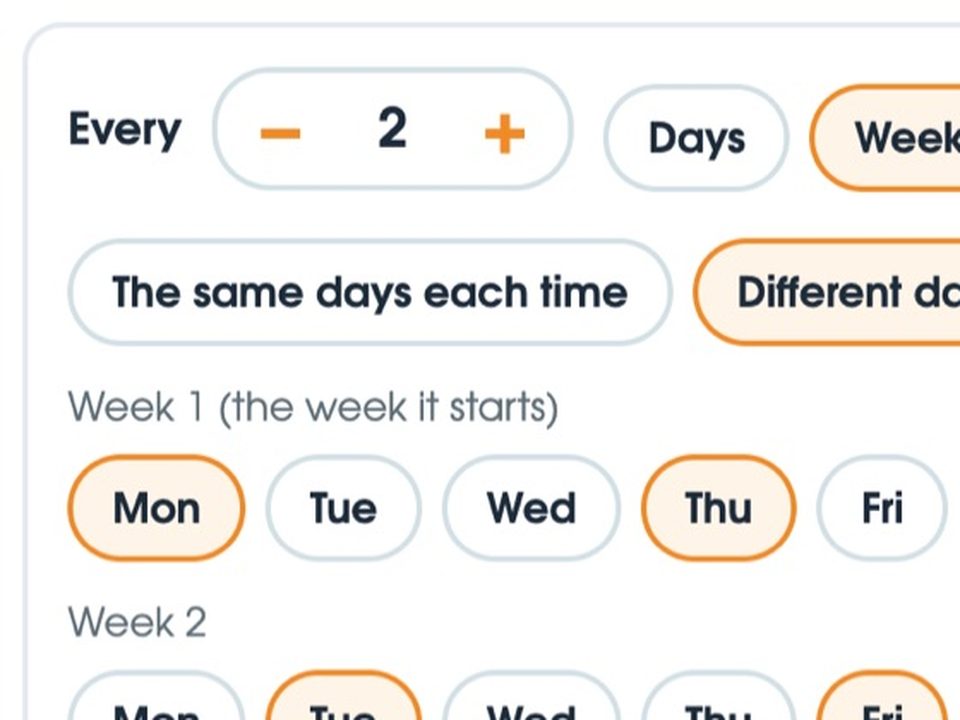
Enter the pattern once
On your phone, open a child’s card, name their other home and set which nights they’re there. The same “how often” picker FridgeBoard uses for everything else handles the patterns separated families actually use:
- Every other weekend. Friday to Sunday, every second week.
- Week on, week off. A two-week pattern: every day in one week, none in the next.
- 2-2-5-5. Two set days with each parent every week, then alternating five-day stretches across the weekend.
- Different days each week. Monday and Thursday in week 1, Tuesday and Friday in week 2, or whatever your arrangement is.
Weeks count from the start of the week you choose, Sunday or Monday. If the arrangement changes, change the pattern and everything follows.
What chores and routines do when the kids are away
You give the other home a name, like “Mum’s” or “Dad’s”. On the nights a child is there, their card on the shared screen says “At Dad’s tonight”, and the calendar shows it on each of those days, so everyone can see where they’ll be. Their routines rest while they’re away, and a morning routine goes with the night before: if Ivy sleeps at her dad’s on Sunday, Monday’s morning routine isn’t waiting for her on your fridge.
The pattern carries through to their routines and to who’s here. For chores, give them the same pattern (set days, or every other week), so the board isn’t asking for things a child couldn’t have done. When they come back, their card is there with today’s things, in their colour, just as they left it, and the coins they’ve earned are still theirs. More about the chore chart.
Who’s out tonight, and who’s staying
Not everything fits a roster. FridgeBoard has a simple way to say who’s out and who’s staying over, separate from the two-homes pattern:
- Someone’s out. Bo’s at a sleepover, a teenager’s at their dad’s for an extra night, a parent’s away for work. Tag them out for one night, a run of nights, or the same night every week.
- Someone’s staying. Grandma for the weekend, a cousin for the school holidays, a step-sibling every second Friday. Guests show on the calendar too.
- Wait or carry on. For each person you choose whether their routines and chores wait while they’re out, or carry on as usual.
The calendar shows who’s here on each day, and a person’s card says “Out tonight”, so a quick look at the kitchen screen answers “how many for dinner?”. There’s a Who’s out tonight card for Home as well.
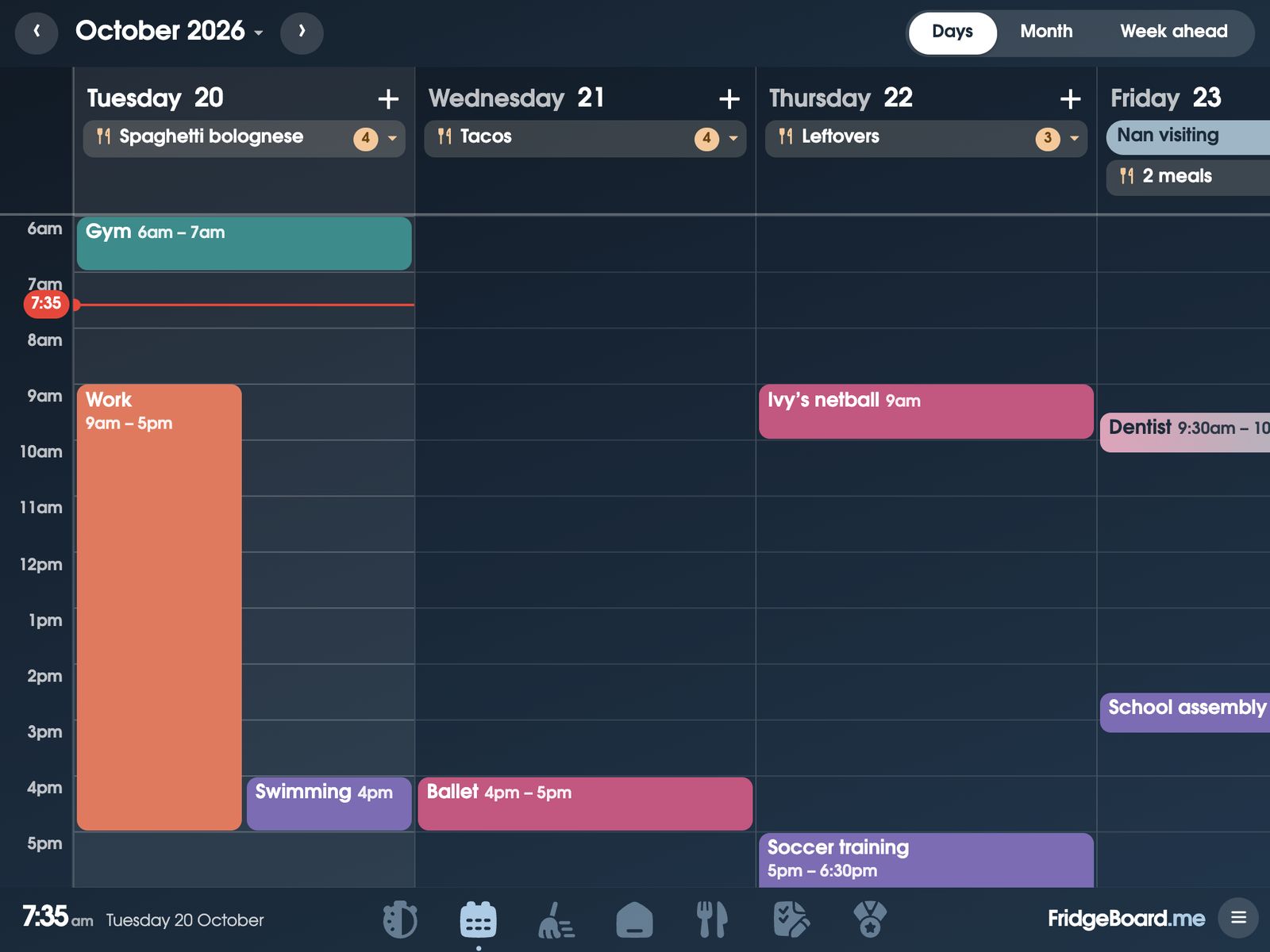
The calendar and the other home
FridgeBoard runs one household’s board, for the people in your home. It isn’t a co-parenting messaging app or a place to keep records for court. What it can do is show the calendars you already use: Google Calendar and Outlook sync both ways, and iCloud, school and club calendars can be shown read-only. If you and the other parent already keep a shared calendar for handovers, it can sit on the screen with everything else, with each child’s events in their colour. More about the family calendar.
Making two homes easier for the kids: a few ideas
Small, predictable things tend to help children most. None of these needs an app.
- Let them see where they’ll sleep. Children cope better when they can check for themselves. A calendar on the fridge with their days marked does that without them having to ask.
- Keep bedtime and mornings similar in both homes where you can. The same steps in the same order, even if the times differ. A routine chart that shows each step helps younger children.
- Make a packing list. School uniform, the reader, the inhaler, the favourite toy. A list they tick off before handover saves a drive back. FridgeBoard lists work well for this, on the fridge and on your phone. More about lists.
- Keep their jobs theirs. Chores set for the days they’re home, and coins kept for them while they’re away, rather than handed to a sibling, tell a child their place in this house is kept.
- Talk about handovers ahead of time. “You’re at Dad’s from Wednesday” the day before is easier than a surprise at the door.
- Count the nights, if it helps. Some children like a countdown to the next handover or the next holiday. A countdown card on the screen can show it.
Setting it up
- On your phone, go to fridgeboard.me and tap Try it free. Add who lives at home, including children who are here part of the week.
- Open each child’s card, name their other home and set the nights they’re there. Add their chores and routines as usual.
- On the iPad, open Safari, go to fridgeboard.me, tap Open, then Use this as the shared screen. Scan the code with your phone.
- Put the iPad on the fridge or the bench. Connect your calendars, and invite any other adults in your home.
It works on any iPad from the iPad 2 on, including old ones that no longer get updates, and on Android tablets and computers. Turning an old iPad into a family screen.
Questions
Can a chore chart handle kids who live between two homes?
Yes. In FridgeBoard you enter a child’s nights at the other home once, and their routines and who’s here follow that pattern, with their card saying where they are tonight. Chores can be set to the same days.
Does it work with a 2-2-5-5 or week on, week off custody schedule?
Yes. FridgeBoard’s repeat picker takes patterns that change from week to week, so 2-2-5-5, week on and week off, every other weekend and other rosters can all be entered once.
Can both co-parents use the same FridgeBoard?
FridgeBoard is one household’s board, for the people in your home. It can show a calendar you already share with the other parent, such as a shared Google Calendar.
How do I show who’s home for dinner tonight?
Tag someone as out for a night, a run of nights or every week, and tag guests who are staying. The calendar and each person’s card show it, and there’s a Who’s out tonight card for the shared screen.
Do the kids lose their coins when they’re at the other house?
No. Coins they’ve earned stay theirs while they’re away, and their card is waiting with today’s things when they come back.
Is it a subscription?
No. FridgeBoard is one payment for the whole household (US$24 plus tax in the US, A$39 in Australia), with every feature included and a 5-day free trial with no card needed.