Home › Features › Cleaning schedule
A household cleaning schedule that remembers when it was last done
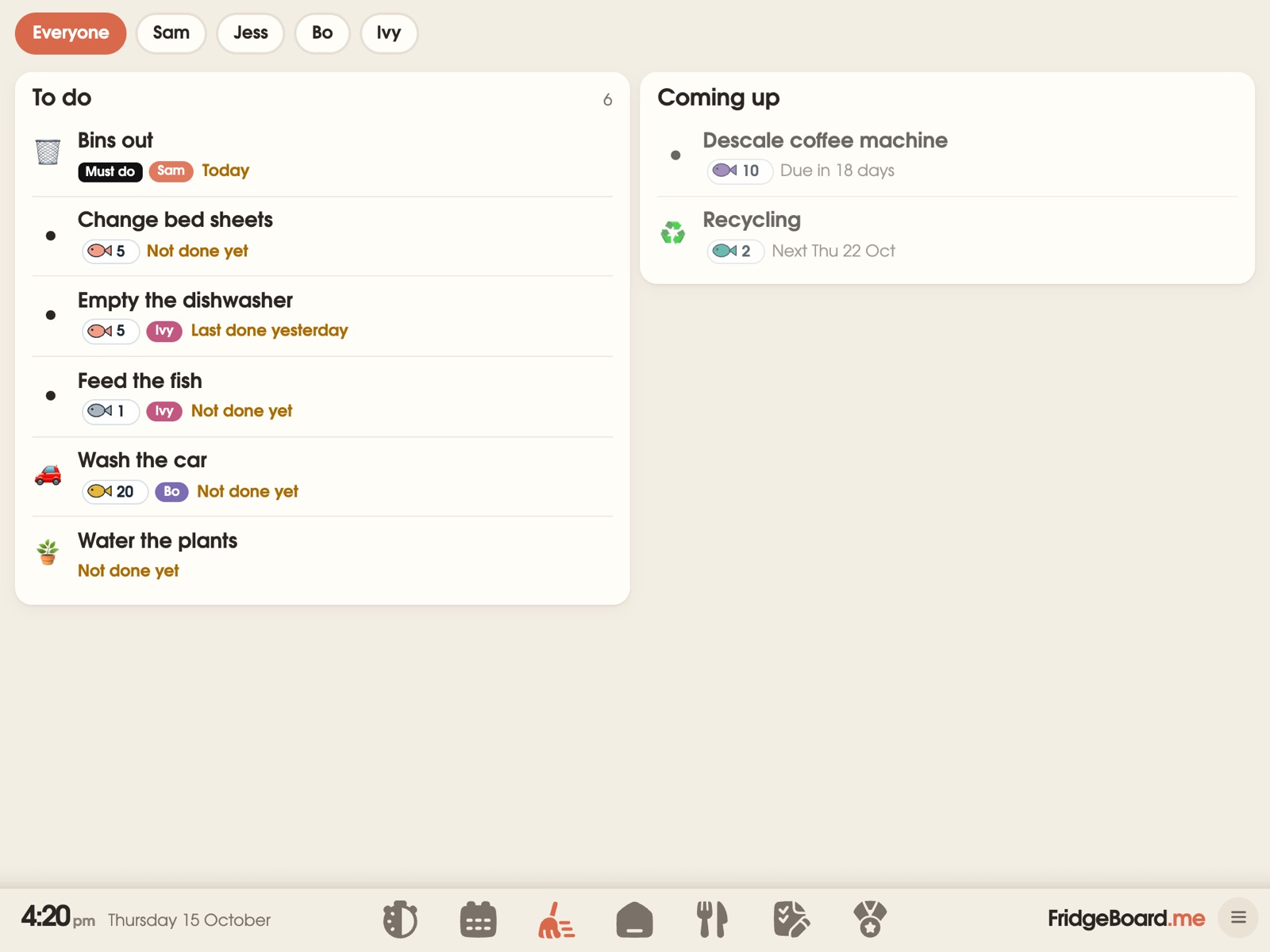
FridgeBoard keeps your household cleaning schedule on the shared screen in the kitchen and on every phone at home: everyday chores by room, the jobs that only come round every few months, and which bins go out tonight. When someone has ten minutes, “What should I do now?” picks one job at a time from about 200 everyday jobs, so nobody has to stand there deciding.
A cleaning rota that shares the work
Put each job on a person, or on a few people who take turns. FridgeBoard knows whose turn it is and swaps each time it’s done, each day or each week, so the bathroom rota (or cleaning rota, if you’re in the UK) isn’t a debate every Saturday. Jobs that belong to nobody, like wiping the bench or emptying the bin, can be Any time jobs: whoever does it taps their circle and gets the credit.
Children see their own jobs on their card on the fridge, and can earn coins for them if you use coins. Adults add and change jobs from their phones. More about the chore chart.
House chores by room
Give each chore a room (kitchen, bathroom, laundry, bedrooms, outside) and the Chores tab can show a column a room, so you can clean one room properly instead of half of four. One-off jobs, like “fix the drawer” or “book the carpet clean”, can go in sections you name yourselves.
Chores can have steps, so “clean the bathroom” can mean the same thing to everyone: mirror, sink, toilet, floor. They can be skipped for a day or moved to tomorrow without breaking the pattern.
Home maintenance reminders
The jobs that cost money when they’re forgotten are the ones that come round every few months. FridgeBoard lets them repeat from when they were last done, not on a fixed date: “descale the coffee machine 30 days after it was last done”, “clean the dryer filter after it was last done”, “replace the fridge water filter every 6 months”. Done late? The next one counts from then.
- Descale the kettle and the coffee machine.
- Clean the range hood and dishwasher filters.
- Test the smoke alarms.
- Clean the gutters and check the roof after storms.
- Service the air conditioner or heater before the season starts.
Bin day and trash night reminders, with your bin colours
Tell FridgeBoard which bins you have, what day each goes out and whether it’s weekly or fortnightly. The calendar shows bin icons on the right days in the right colours, and the night before, a “Bins out tonight” line shows which ones. In the US it says trash and recycling, in Canada garbage, and you can change the colours to match your council’s or city’s bins.
“What should I do now?”: one job at a time
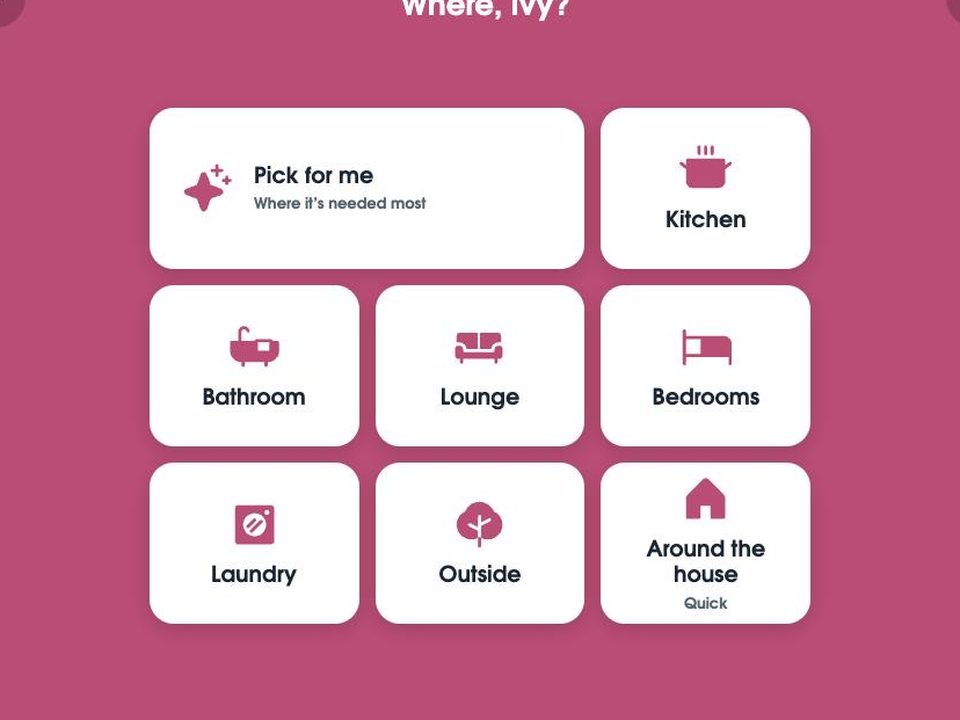
Some days the hard part isn’t the cleaning, it’s deciding where to start. On the shared screen, tap “What should I do now?”, pick a room (or Pick for me) and how long you’ve got. FridgeBoard picks one job at a time from about 200 everyday jobs that suit your home, with Done, Skip and a timer. It asks a few questions the first time, like how many bathrooms and what bins you have, and only suggests jobs that are actually due.
Children can use it too. Jobs that need a grown-up, like the oven or anything with chemicals, are “Careful jobs”, and you choose who gets those. Step-by-step, one-thing-at-a-time jobs are a common way to help children who get overwhelmed by a big task, and this works the same way: one clear job on the screen at a time.
A practical cleaning checklist: daily, weekly, monthly, seasonal
A starting point for most homes. Take out what doesn’t apply to yours, and start with less than you think: a short list that gets done beats a long one that doesn’t.
Every day
- Dishes done or in the dishwasher, and the dishwasher emptied.
- Wipe the kitchen benches and the stovetop.
- Quick tidy of the lounge: toys, shoes, cups back to the kitchen.
- Kitchen bin out if it’s full.
Every week
- Clean the bathroom: toilet, sink, shower, mirror.
- Vacuum and mop the floors.
- Change the bed sheets and towels.
- Wipe the inside of the microwave and clean out the fridge before the weekly shop.
- Dust the surfaces people actually see.
- Bins out on bin night.
Every month
- Clean the range hood filter and the dishwasher filter.
- Wipe the skirting boards, light switches and door handles.
- Vacuum the couch and under the cushions.
- Descale the kettle (sooner if you have hard water).
- Press the test button on each smoke alarm. Fire services such as Fire and Rescue NSW recommend testing them every month.
Every season (about every three months)
- Wash the windows and the fly screens.
- Clean the oven.
- Turn or vacuum the mattresses.
- Clear out the pantry and check the use-by dates.
- Clean the air conditioner or heater filters before you need them.
Every year
- Clean the gutters (more often if you have trees nearby).
- Wash the curtains or blinds.
- Check the dates on your smoke alarms. As a rough guide, the U.S. Fire Administration says to replace them 10 years from the date they were made. Your local fire service’s advice comes first.
Every item on this list can be a chore in FridgeBoard, on a person or a rota, with its own “how often”.
Setting it up
- On your phone, go to fridgeboard.me and tap Try it free. Add who lives at home.
- Pick chores from the list or add your own, with a room, how often, and who does them. Add your bins and their days.
- On the iPad, open Safari, go to fridgeboard.me, tap Open, then Use this as the shared screen. Scan the code with your phone.
- Put the iPad on the fridge or the bench, where everyone walks past it.
It works on any iPad from the iPad 2 on, including old ones that no longer get updates, and on Android tablets and computers. Turning an old iPad into a family screen.
Questions
What’s the best way to make a household cleaning schedule?
Split jobs into daily, weekly, monthly and seasonal, give each one a person or a rota, and keep it somewhere everyone sees. FridgeBoard does this on the fridge and every phone, with jobs that repeat from when they were last done.
Can a cleaning rota rotate between people automatically?
Yes. A FridgeBoard chore can take turns between two or more people, swapping each time it’s done, each day or each week, so everyone knows whose turn it is.
Is there an app that reminds me when to put the bins out?
Yes. FridgeBoard shows which bins go out tonight, in your bins’ colours, on the shared screen and the calendar, for weekly and fortnightly collections.
Can it remind me about home maintenance like filters and descaling?
Yes. Jobs can repeat a set time after they were last done, such as descaling the coffee machine 30 days after last time, so a late one doesn’t throw the rest out.
What should I clean when I only have 10 minutes?
Pick one room and do the job that makes the most difference, like the kitchen benches or the bathroom sink. FridgeBoard’s “What should I do now?” picks one job at a time for the room and time you choose.
Is it a subscription?
No. FridgeBoard is one payment for the whole household (US$24 plus tax in the US, A$39 in Australia), with every feature included and a 5-day free trial with no card needed.