Home › Features › Photo frame and clock
Use an old iPad as a digital photo frame and a clock
FridgeBoard turns an old iPad into a digital photo frame and a clock you can read across the room. After a few quiet minutes the screen shows up to 10 of your family photos, a big clock face, or your team’s live score, and at night it goes dark at the times you pick. A tap brings back the family calendar, chores and shopping list, so the iPad on the bench is useful all day, not just pretty.

An old iPad as a digital photo frame
Most of the day, nobody is touching the kitchen screen. That’s when the sleep screen takes over. Add up to 10 photos from your phone (the phone makes them smaller before they upload, so they load quickly even on an old iPad) and the screen shows them in turn:
- How often they change. Every minute, every 5, 15 or 60 minutes, or once a day. If you have more than one screen, they all show the same photo at the same time.
- All of them or just one. A slideshow, or the one photo you love.
- Fill the screen or show the whole picture. Fill crops to the edges; whole keeps everything in.
- A small clock in a corner, with the date if you like, or no clock at all.
Ten photos is a deliberate limit. It keeps the screen quick on old iPads, which can only keep so many pictures ready at once.
An iPad as a kitchen clock you can read across the room
Instead of photos, choose a clock face. They’re designed to be read from the other side of the kitchen, and each has its own colours and fonts:
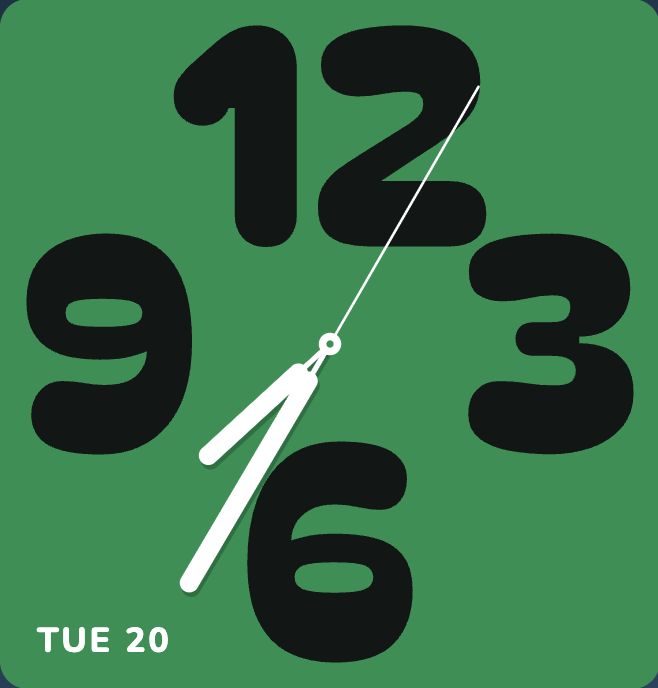
- Big numbers. Huge 12, 3, 6 and 9 with proper hands, in bold, friendly fonts.
- Artistic pets. A cat or dog whose eyes tell the time, with a new pet as often as every minute or once an hour.
- Sun. Today’s path of the sun across the sky where you live, with the next sunrise or sunset.
- Frame. A clean, square-edged face that can show the temperature outside.
- And more: embossed numbers, light and shadow, colour sweeps and rainbow wedges.
You pick the face on the screen itself, from ☰ › Sleep screen, with a live preview. Each screen in the house can have its own. The same faces can sit on Home as a clock card, next to the calendar and the weather, and a world clock card shows the time where Grandma lives.
Live sports scores on the screen
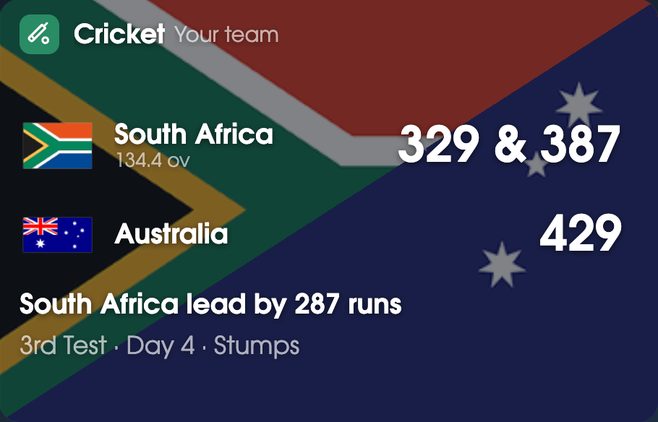
Pick your leagues and teams on your phone, and the screen shows the live score when your team is playing (or every live game in a league, if you choose), and the ladder or table and the next game when nothing’s on. On iPads with iOS 9 or 10, the screen asks you to install a small profile first. It covers 22 leagues, including the NFL, NBA, MLB, NHL, MLS, AFL, NRL, the Premier League, cricket, golf, tennis and F1. Scores can be the sleep screen or a card on Home, so you can glance at the game while you’re cooking.
Night mode: goes dark at the times you pick
A bright screen in the kitchen at midnight is no good, and on a bedside table it’s worse. Set the hours it dims and sleeps at night, and add set times for when nobody’s home, like school and work hours on weekdays. A tap wakes it for a few minutes. Timers and medicine reminders still come through, and messages from your phone still arrive.
As a bedside clock, a dimmed face is easy to read in the dark without lighting up the room. If your home runs Home Assistant, a motion sensor can wake the screen when someone walks in. FridgeBoard and Home Assistant.
Turning an old iPad into a photo frame or clock: what you need
Whatever you end up running on it, a few things make an old iPad a good always-on screen:
- Keep the screen on. Settings › Display & Brightness › Auto-Lock › Never (on older iPads, it’s under Settings › General). Let the sleep screen handle the night.
- Keep it in one app. Guided Access (Settings › Accessibility, or Settings › General › Accessibility on older iPads) stops little fingers wandering off to YouTube.
- Use a proper charger. 10W or more. A small phone charger can’t keep an iPad going all day.
- Turn the brightness down. About halfway is plenty indoors, and kinder to the battery.
- Mount it where you look. A cheap stand on the bench, adhesive magnets on the fridge, or a wall mount. Landscape suits photos and clocks best.
- Pick landscape photos. Most iPads are 4:3 on their side, so photos taken sideways fill the screen best. Upright (portrait) photos get cropped or shown with space at the sides.
- Watch the battery. If an old iPad’s battery swells or the case starts to lift, unplug it and stop using it.
Every iPad from the iPad 2 on works, even ones that stopped getting updates years ago. More about using an old iPad.
Setting it up
- On your phone, go to fridgeboard.me and tap Try it free. Add who lives at home.
- On the iPad, open Safari, go to fridgeboard.me, tap Open, then Use this as the shared screen. Scan the code with your phone.
- On your phone, go to Settings › Sleep screen photos and add up to 10 photos. For scores, pick your leagues and teams in Live scores.
- On the iPad, tap ☰ › Sleep screen and choose your photos, a clock face or live scores. Set night mode on your phone in Settings › Shared screens.
Questions
Can I use an old iPad as a digital photo frame?
Yes. FridgeBoard runs on every iPad from the iPad 2 on, and its sleep screen shows up to 10 of your photos, changing as often as you choose, with a small clock in the corner if you want one.
How many photos can I put on the screen?
Up to 10. The limit keeps the screen quick on older iPads, and you can swap photos from your phone at any time.
Can an iPad be a kitchen clock you can read from across the room?
Yes. FridgeBoard’s clock faces are made to read across a room, with big numbers, a new pet as often as you like, the sun’s path and more, as the sleep screen or as a card on Home.
Can it show live sports scores?
Yes. FridgeBoard shows live scores from 22 leagues, including the NFL, NBA, Premier League, AFL, NRL, cricket, golf, tennis and F1, as the sleep screen or a card on Home.
Can the screen turn itself off at night?
Yes. FridgeBoard dims and sleeps at the hours you pick, and can also sleep at set times when nobody’s home. A tap wakes it, and timers and messages still come through.
Is it a subscription?
No. FridgeBoard is one payment for the whole household (US$24 plus tax in the US, A$39 in Australia), with every feature included and a 5-day free trial with no card needed.